Construction workforce scheduling software for SMEs with licence and certification compliance, ERP-integrated
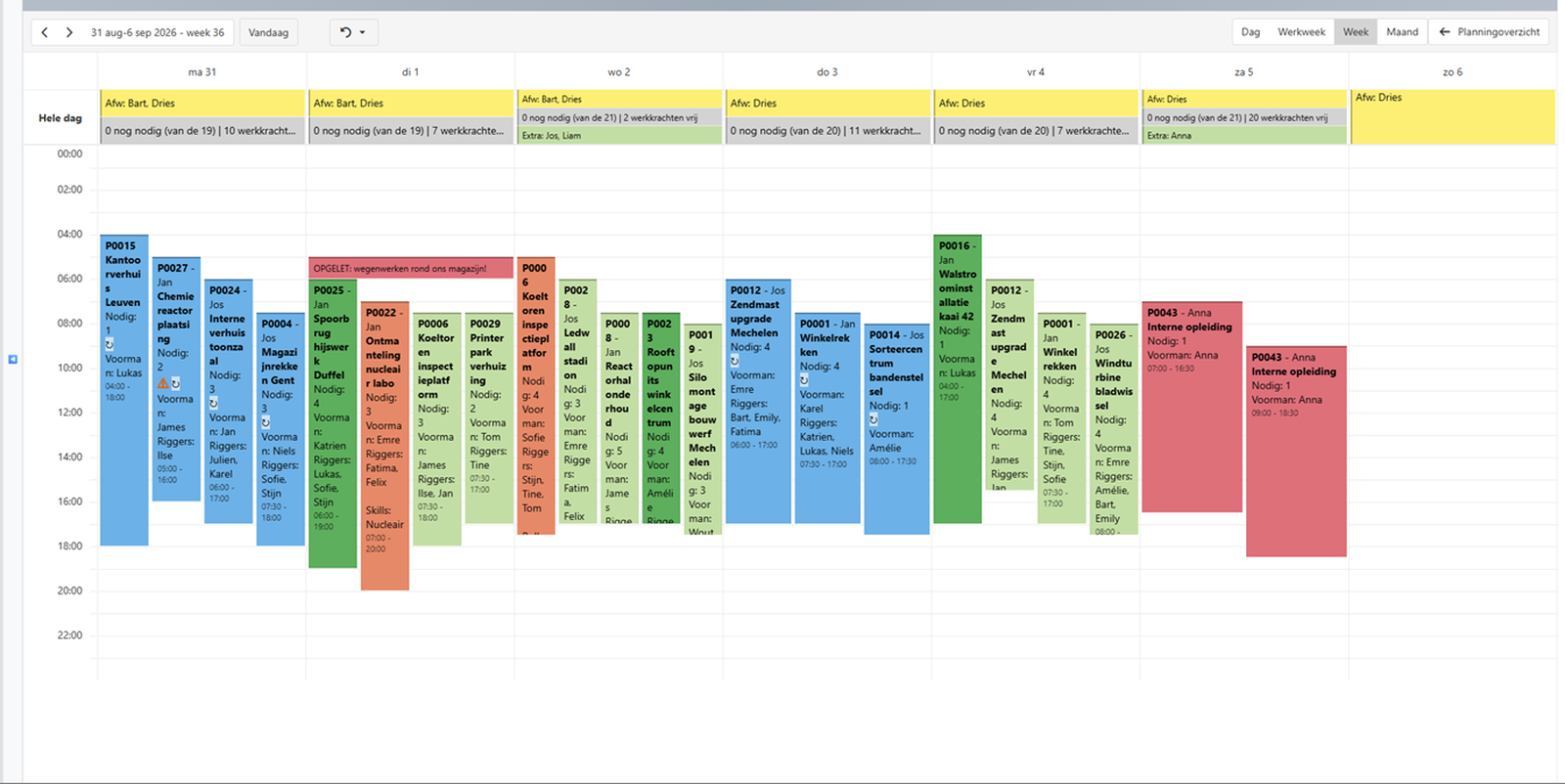
Double bookings across people and equipment, EU driving-licence categories C/CE/BE, safety certifications and site-access qualifications, absences: you drag your jobs onto the board, Planningtool guards the rest. Orange turns green by itself — or one click shows you why not.
“Eight to ten jobs a day, and the board tells me instantly what isn't right yet.”
 Jolein Van Steendam, managing director
 LIFTHING
Sound familiar?
On the whiteboard or in Outlook, nobody sees that Wout is already assigned elsewhere on Monday. You find out at 7 a.m. — and lose a crew-day.
Who may drive which truck or trailer? A driver without the right licence category behind the wheel is illegal — and right now that knowledge lives in someone's head or an unmaintained spreadsheet.
SCC/VCA diplomas, CSCS cards, Safe Pass, site-access qualifications, operator certificates: on some sites everyone must be compliant, or access is refused at the gate.

Why Planningtool is different
The short answer: almost every tool can store certificates; some send an alert when one expires — and the scheduler can still publish the shift anyway. Planningtool blocks: the scheduling board knows the rules and flags a non-compliant assignment at the moment of scheduling — no driver without the right licence category, no worker without the required certification, before the crew is dispatched.
Certificates and licences sit somewhere as a document, a spreadsheet or a field on the employee record. The schedule knows nothing. This is what most ERP and HR tools do.
An email when a certificate is about to expire. Better — but alerts get dismissed, and the schedule itself still checks nothing. The assignment goes through anyway.
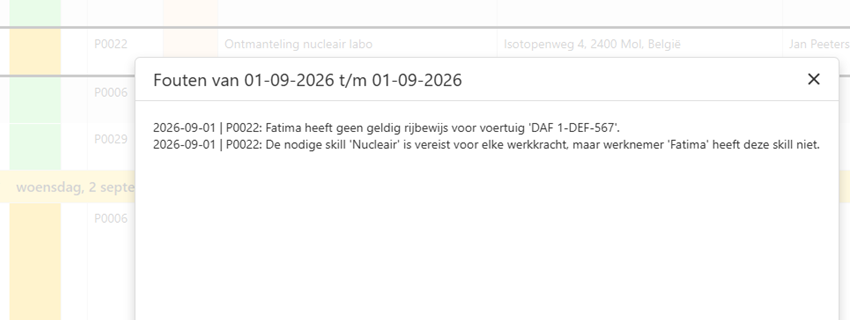
The rule lives inside the scheduling board. An assignment that isn't allowed — wrong licence category, missing certification, double booking — is flagged immediately, before the schedule is published to site. Orange turns green on the board, not on site.
Independent market research (June 2026) found no mainstream construction scheduling software that enforces driver-licence categories per vehicle as a pre-scheduling constraint — competitors describe their compliance features as “tracking” or “monitoring”, and their schedulers can override warnings.
What's at stake
12 × €199 = €2,388 per year on Growth, against at least €25,000 in scheduling errors at 20 workers.
Indication based on sector estimates: Figures based on Belgian construction sector pay scales (PC 124, 2025) and published rental and fine rates 2025–2026 Work it out with your own figures →
How it works
The short answer: Planningtool syncs projects, workers, vehicles and equipment from your ERP (Robaws supported today, others on request), lets you schedule on a drag-and-drop weekly board with compliance enforced at assignment time, and pushes the approved schedule back so field workers see it on their phones.
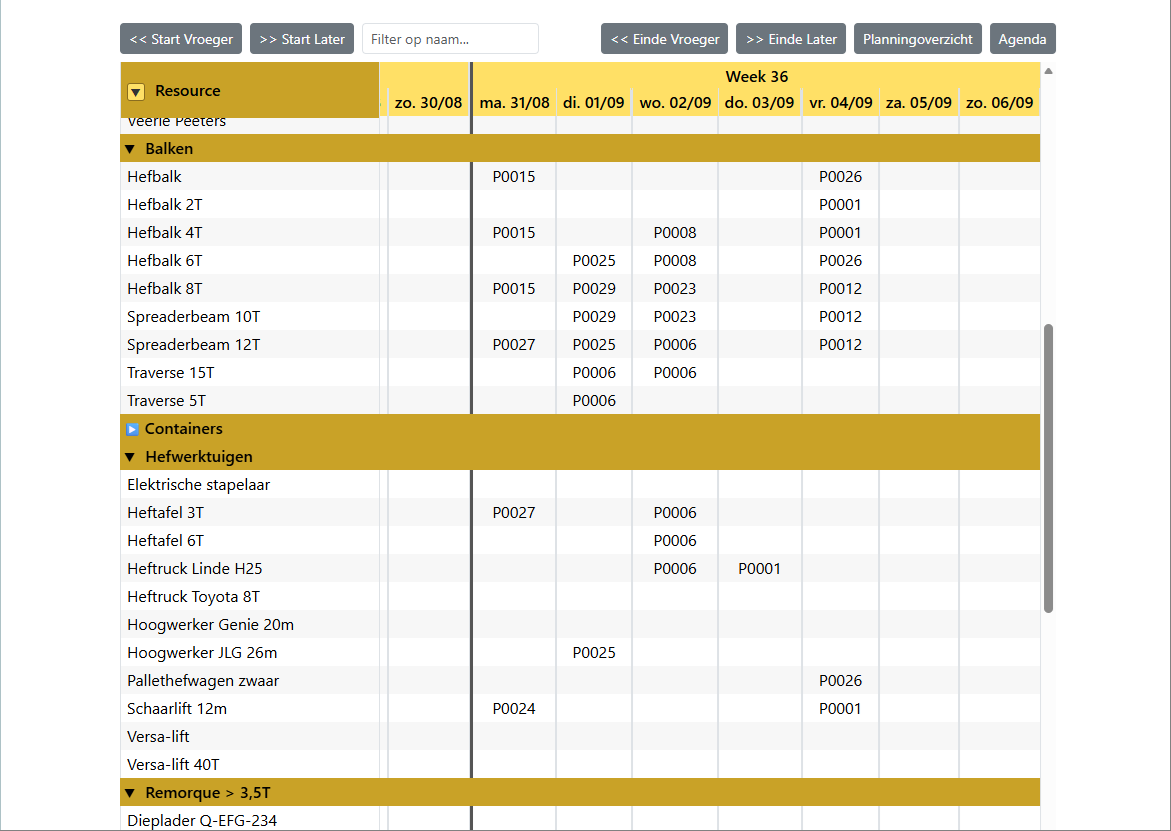
Projects, workers, vehicles and equipment load automatically from your ERP — or you manage them directly in the tool. No double data entry.
Drag jobs onto days, set crew size, assign people and equipment. Payroll workers are scheduled first; subcontractors only when explicitly marked as extra workforce for that day.
Double bookings across people and equipment, driving-licence categories per vehicle, certification requirements per site, absences — checked continuously, conflicts flagged instantly.
The approved schedule flows back to your ERP as schedule items — ready for job costing and payroll — and appears on your workers' phones. One source of truth, from office to site.
No ERP? Planningtool runs fully standalone — you manage workers, vehicles and certificates directly in the tool. Built in Belgium, served fully remotely, hosted in Belgium.
References
Several Belgian companies already work with our software every day — Planningtool schedules their crews, cranes, spreaders and more, and our quotation tools support renovation and construction projects.
LIFTHING
Who it is for
The short answer: Planningtool is construction workforce scheduling for building and installation contractors with 5 to 50 workers who have to schedule crews, vehicles, machines and certifications together. It is not time tracking, not Gantt project scheduling and not shift rostering.
| Excel, Outlook or whiteboard | Day planner inside an ERP | General scheduling tool | Planningtool | |
|---|---|---|---|---|
| Double booking of people | Nobody notices | Usually flagged | Usually flagged | Orange at the moment of scheduling |
| Double booking of vehicles, machines and equipment | No | Rarely | Sometimes | Yes, the same check as for people |
| Driving-licence category checked per vehicle | No | No | No | Yes: B, BE, C, CE |
| Certification as a condition per job | No | At most stored as a document | At most an expiry reminder | Yes, configurable per job |
| Why is it not right? | Find out yourself | Find out yourself | Find out yourself | The reason one click away |
| Pricing model | Free, until it goes wrong | Per user | Per user or per resource | Per company, from €99 per month |
Comparison by type of solution, based on independent market research into construction schedulers in the Benelux (June 2026). Individual products may differ.
Features
One scheduling board for your crews, vehicles and equipment — built for contractors who run crews, machines and certifications.
One worker can't be on two sites — and neither can a spreader, crane or van. Even a machine listed under two names — the same crane in a different configuration — is known to the board as one physical unit. Conflicts turn orange instantly, across the whole week.
Every vehicle knows its required EU licence category; every worker their held categories. CE may drive C, BE may not — the board knows before you have to.
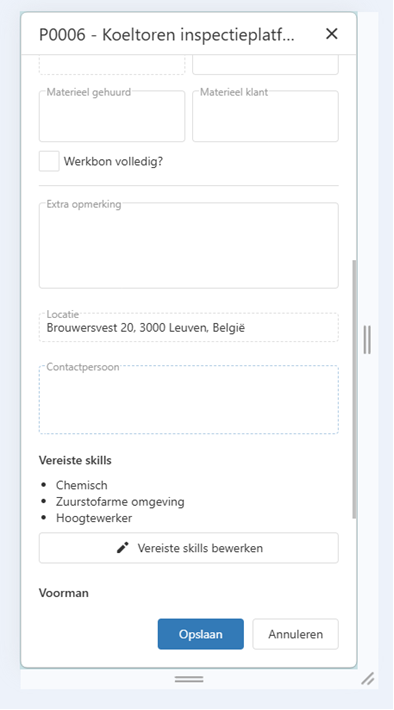
SCC/VCA, CSCS, Safe Pass, site-access qualifications, operator certificates — configurable per site: one certified person, two for two machines, or everyone. Non-compliance is flagged before dispatch.
Your own payroll crew is scheduled first by design. Subcontractors and occasional workers are only schedulable when explicitly marked as extra workforce that day.
Sick or on leave = not schedulable. No Monday-morning surprises, no crew one worker short.
Admin, planner, project lead or reader (view-only, handy for new staff): who may change crew sizes, who may assign people. Every user signs in personally; your data is kept strictly separated per company.
Not just for the planner
Not just the planner: every worker sees their own schedule days ahead, right on their smartphone. Whoever has to leave for Antwerp at 4 a.m. on Thursday doesn't find out at the kitchen table on Wednesday night. A clear schedule, communicated early: fewer missed appointments at home, a better mood on the work floor.

Pricing — per company, not per user
One lost crew-day from a double booking or a refused site access easily costs a three-person crew €1,100 to €1,800 — more than a year of Planningtool. Prices per company per month, excl. VAT. Pricing follows the size of your schedule — the people and machines on the board. The number of users doesn't matter: planners, project managers and read-only viewers are unlimited.
Prices excl. VAT. Onboarding tailored to you (we load your workers, vehicles and certificates, configure certifications, train your planners and put your first real week on the board): price after a short call, because the work depends on your situation. Payment: annually in advance, or monthly by direct debit. First year fixed, monthly cancellation afterwards. Loose equipment such as lifting beams, spreaders, lift tables and scaffolding does not count as a vehicle or machine: unlimited on every tier.
ROI calculator
Enter your figures. You get the yearly cost of lost crew-days and refused site access, your ROI and your savings over 1, 3 and 5 years, with sources. No email address needed.
Frequently asked questions
Building and installation contractors with 5 to 50 workers who schedule crews, vehicles, machines and certifications together: machine movers, hoisting and crane companies, scaffolders, industrial subcontractors and contractors with a mixed fleet. Larger groups made up of several companies or smaller teams can use it as well. Planningtool is not time tracking, not Gantt project scheduling and not shift rostering.
Tracking stores certificates and may send an expiry reminder; the scheduler can still publish a non-compliant shift. Enforcement means the scheduling board itself knows the rules: an assignment that breaks a licence or certification requirement is flagged at the moment of scheduling, before the crew is dispatched. Planningtool enforces; most tools only track.
Planningtool assigns each vehicle its required EU driving-licence category (B/BE/C/CE) and each worker their held categories. At scheduling time the board matches them automatically — a CE holder may drive a C vehicle, a BE holder may not — and flags any non-compliant assignment before the schedule is published.
Every scheduling action is checked against the whole week for people and equipment simultaneously: a worker, truck, crane or spreader already assigned elsewhere that day turns the job block orange immediately.
Certificate types are configurable per company: SCC/VCA (Belgium, Netherlands, Germany), CSCS and CPCS cards (UK), Safe Pass (Ireland), site-access qualifications such as chemical-site or confined-space training, and equipment-specific operator certificates. Requirements are set per site: one certified person, two for two machines, or everyone on site.
Planningtool is ERP-integrated: projects, workers, vehicles and equipment sync automatically and the approved schedule flows back to your ERP as schedule items (ready for job costing and payroll) and to your workers' phones. Robaws is supported today; other ERP connectors are available on request, and the tool also runs fully standalone.
Payroll workers are scheduled first by design. Subcontractors and occasional workers can only be scheduled on days they are explicitly marked as extra workforce — a deliberate action, so external workers never end up on a site by accident.
Yes. Planningtool is built in Belgium and served fully remotely: onboarding, support and training run online. The certificate engine is configurable for UK (CSCS/CPCS), Irish (Safe Pass) and international SCC contexts.
Yes — deliberately. Planningtool checks the licence and certification requirements you configure; it does not establish legal compliance. Every check can be explicitly overridden when reality demands it. The difference with a missed warning: an override is a visible choice on the board, not an accident. The planner stays in charge.
Your data is kept strictly separated per company and hosted in Belgium. Certificates and licences are personal data; a GDPR data-processing agreement is therefore included.
A first version, yes. The work is in what comes after: rules that hold for every site, every vehicle and every exception; a Robaws link that keeps working when Robaws changes; and sharing the schedule with your whole team while your people's licences and certificates stay protected, separated per company on a server in Belgium. Planningtool does that every day, and we maintain it.


Planningtool is a product of Unflatten BV, founded by Benny Willen and Koen Achtergaele — based at the Wintercircus, the tech hub in the heart of Ghent. Benny brings thirty years of experience in and around the construction sector and handles the commercial and strategic side; Koen is the developer who built the scheduling board and sharpens it week after week together with our customers. We know the world of job sites, machines and certifications from the inside — which is why Planningtool checks exactly the things that really go wrong there: we have felt these pains ourselves.
A 20-minute scheduling review, on your own schedule
No sales pitch — we schedule your real jobs together and you see immediately what turns orange.